
Each checklist view can be configured differently to better fit its use.
To open the configuration:
-
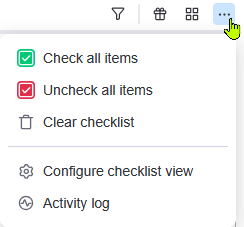
Open the menu at the top right of the checklist view.
-
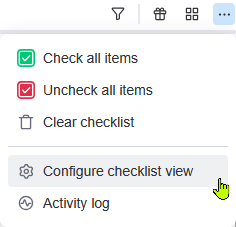
Open Configure checklist view menu item.
-
The following window will appear.
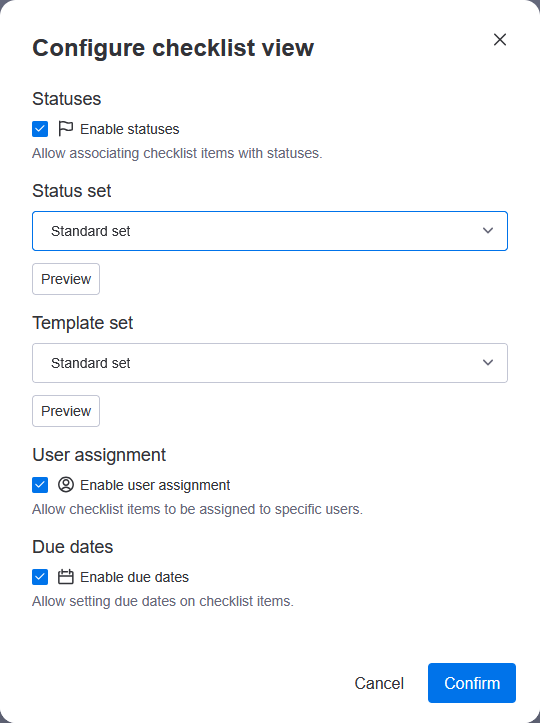
Statuses
Enabling the Enable statuses checkbox lets users assign statuses to checklist items from the selected status set.
Status set
When statuses are enabled, only statuses from the status set can be selected. You can preview the status set to see what statuses it contains, or change for another status set.
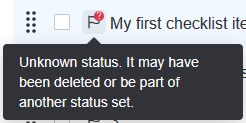
What happens with assigned statuses if I change the status set?
Assigned statuses will show as Unknown, informing you that a status was present, but it cannot be found in the current status set. The same behavior can occur when a status is deleted from a status set.
Template set
You can select what template set templates can be imported from and are created in.
Templates created from the checklist view are added to the selected template set. See Using checklist templates for more details on how to use templates.
User assignment
Enabling the Enable user assignment checkbox lets users assign themselves or other users to checklist items.
Due dates
Enabling the Enable due dates checkbox lets users assign due dates and times to checklist items.