
The points program is the core foundation of most reward programs. The program revolves around earning points based on specific actions like signing up or spending money, and then redeeming rewards that have a point cost.
Earning points
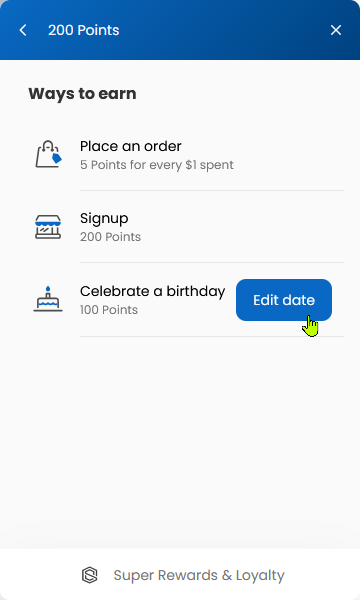
Customers can earn points in many ways. By default, three ways to earn are enabled. Marked below as on by default .
|
Feature |
Description |
|---|---|
|
on by default Place an order |
The customer earns points based on the total amount they spend on orders they place. |
|
on by default Sign up |
The customer earns a point bundle upon signing up. |
|
on by default Celebrate a birthday |
The customer is awarded points on their birthday. The customer must fill in their birth date to get access to these points.
|
|
Social media interaction |
From liking on Facebook to following on Instagram, you can configure a series of social media interactions that will award points to the customer once they complete the action. The social media interaction you want is missing? Reach out and we’ll be happy to take a look! |
Spending points
Your customers can use their earned points to redeem your configured rewards. By default, three rewards are enabled. Marked below as on by default .
|
Feature |
Description |
|---|---|
|
on by default Free shipping coupon |
A free shipping discount is generated for the customer that they can apply to any order, discounting the shipping costs. |
|
on by default Percentage coupon |
A percentage discount is generated for the customer that they can apply to any order. By default, a “15% off coupon” is available to redeem that applies to the entire order. |
|
on by default Fixed amount coupon |
A fixed amount discount is generated for the customer that they can apply to any order. By default, a “20$ off coupon” is available to redeem that applies to the entire order. |
|
Free product |
You can list your products as redeemable free-of-charge for a number of points of your choosing. You can configure if you want the redeem to be added to the cart or if the redeem automatically generates a fully discounted order with the redeemed product. |
|
Gift card |
The customer can redeem a gift card of a dynamic denomination. The settings let you configure the ratio of points-per-dollar you want to offer your customers. For instance, if you set the ratio to be 100 points per dollar, the customer can use as many 100 point increments to trade-in for a gift card. 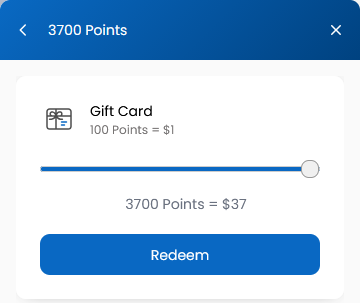
|
Points expiry
Unused awarded points can be considered a not-so-predictable future cost. Adding an expiration date to points awarded customers, paired with reminder notifications, is an effective way to encourage customer engagement and reduce your financial liability.
By avoiding customers that sit on a large number of points, you avoid uncontrolled liability spikes if they come back much later to redeem.
Be careful on how you configure your point expiry! A bad configuration will make your customers feel punished, while a good configuration will increase engagement, point spending and reduce liability.
Expiration period
This determines the life time of points.
Each earned point will have a lifetime of what is configured, and the oldest points are always the first ones to be consumed.
For example, if you configure the expiration period to be 1 year;
-
Points awarded on January 1rst of this year will expire on January 1rst of the next year.
-
Points awarded on February 1rst of this year will expire on February 1rst of next year.
-
If 100 points were awarded on each date (200 points total), and the customer redeemed something for 150 points, then the remainder 50 points will expire on February 1rst of next year.
Expiration reminder email
A first reminder email can be sent to customers letting them know that they have points that will soon expire.
The field determines how many days prior to the points' expiration date the reminder email should be sent.
You can configure the email that will be sent to your customers! See Settings | Customer emails
Expiration final reminder email
A second and last email can be sent to customers letting them know that they have points that are about to expire.
The field determines how many days prior to the points' expiration date the final reminder email should be sent.
You can configure the email that will be sent to your customers! See Settings | Customer emails